Best Video Drones for Beginners: Smooth Aerial Footage Made Easy
Whether you’re learning to pilot or just want high-quality footage for family videos, these beginner-friendly drones pair simple controls with capable cameras. Each model below emphasizes stability, safety features, and intuitive capture modes to help newcomers create impressive videos without a steep learning curve. Below is a quick summary of the chosen products to help you compare features at a glance.
- GPS Drone with 4K Camera for Adults — 4K video, GPS safety, long flight time
- Drone with 1080P Camera for Beginners — Voice control and gestures for easy shots
- Foldable Drone with 1080P Camera for Beginners & Kids — Real-time FPV and kid-friendly design
- Drone with Camera – Screen on Controller — Built-in display for real-time viewing
- Drone with Camera for Adults — 2K HD camera with altitude hold and easy controls
GPS Drone With 4K Camera For Adults

The GPS-enabled design delivers stable flight control and reliable positioning, essential for beginners who are building confidence. Return-to-Home (RTH) helps ensure safe recovery if the signal weakens or the battery runs low, minimizing the risk of losing your drone. In practice, GPS Follow and Circle Fly modes enable hands-free tracking of a moving subject or capturing sweeping, panoramic shots with minimal effort. This combination supports smoother flight paths and more dynamic video results for new pilots.
The 4K camera provides crisp visuals with a wide 110° field of view and a 90° adjustable lens angle, allowing you to tilt for dramatic perspectives. The remote-stabilized mount reduces shake, helping you produce professional-looking footage from beginners’ flights. Gesture control adds a human-friendly way to trigger shots, turning moments into memories with simple hand movements. With careful operation and a safe distance from obstacles, this drone can help you develop a confident, consistent filming style.
Flight stability is aided by brushless motors that resist wind better than basic units. Optical flow positioning, together with GPS, locks you onto a precise location for steady hovering and accurate waypoint planning. The result is a drone that’s forgiving for first-timers while still offering advanced features to grow into. Always fly in open spaces, avoid crowded areas, and follow local regulations for safe, responsible use.
Drone With 1080P Camera For Beginners And Adults

This model emphasizes easy start-up and practical, everyday use. It offers a 1080P camera with adjustable angles to help you capture what matters, whether you’re filming a quick selfie flight or surveying a roofline from above. The key advantage for beginners is a straightforward workflow: charge the drone, connect via WiFi to the Hiturbo FPV app, and start recording or snapping photos. The app-enabled controls enable more hands-on features while still letting you pilot with a standard remote if you prefer a traditional feel.
Battery life is extended by using two rechargeable packs, allowing roughly two flight segments of about 12 minutes each per battery, which translates to longer practice sessions and more sample footage. The balance between remote control and app-based flight gives new pilots a smooth progression path—from basic takeoffs and landings to more creative control as confidence grows. Remember to balance power usage with desired features to maximize the flight experience.
For moments when you want more expressive shots, the app offers voice control and trajectory flight options, along with gesture-based selfies and videos. While beginners should stick to gentle maneuvers at first, this drone makes it easy to expand from simple captures to more dynamic, stable footage with minimal risk of abrupt moves or crashes.
Foldable Drone With 1080P Camera For Beginners & Kids

Designed with younger users in mind, this foldable drone keeps things approachable while delivering real-time FPV visuals through a companion app. The camera provides 1080P quality with a 90° adjustable lens, enough to capture bright aerial shots and family moments from above. The user-friendly features—one-key takeoff/landing, altitude hold, headless mode, and multiple speed settings—support steady flights for beginners and kids alike.
The drone ships with two rechargeable batteries, extending flight time to up to about 30 minutes total across batteries, a helpful feature when practicing or filming longer sessions. Gestures enable hands-free photo and video capture, adding a fun, interactive element. This model is well-suited for younger pilots who want to learn the basics of flight, camera control, and safe operation in a forgiving, kid-friendly package.
Drone With Camera – Screen On Controller

What sets this drone apart is the built-in screen on the controller, enabling live HD viewing without pairing to a smartphone. This feature simplifies setup and lets beginners monitor footage on the fly, reducing the chance of disconnects or missed frames. The 1080P camera supports a stable, clear feed with an adjustable angle to optimize framing while in flight.
Key controls include one-key takeoff/landing, emergency stop, and 360° flips for playful practice. An emphasis on robust build quality and brushless motors provides smoother performance and reliability, which is important for new pilots who are still learning throttle control and stability. Use the app and remote in tandem to experiment with waypoint-like flight patterns and gesture-based captures as you gain confidence.
The combination of an on-controller display, simplified controls, and a capable camera makes this option a strong choice for newcomers who value immediate, visual feedback during flights and easy sharing of footage with friends and family.
Drone With Camera For Adults — 2K HD FPV Drones
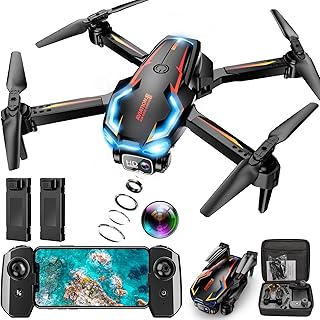
This drone combines a 2K HD camera with FPV capabilities, delivering crisp aerial imagery and a smooth live feed. The 90° adjustable camera angle enables versatile framing for landscapes, events, or indoor shoots. The altitude hold feature simplifies maintainable hover, making it easier to compose shots and ensure stable footage even for beginners who are still refining their throttle finesse.
One-touch takeoff/landing paired with headless mode reduces setup complexity, helping novices concentrate on framing rather than chip away at controls. The inclusion of two batteries means longer practice sessions and more opportunities to capture steady, repeatable footage. The overall design emphasizes travel-friendly portability and user-friendly operation, supporting beginners as they practice basic cinematography from the sky.
Buying Guide: Key Purchase Considerations For Beginners
- Flight stability and safety features — Look for GPS positioning, Return-to-Home, and altitude hold to help maintain control and protect your investment.
- Camera quality and flexibility — For beginners, 1080P or 2K cameras with adjustable angles deliver solid footage. If you’re aiming for higher resolution later, consider models with 4K but assess if the extra price aligns with your needs.
- Ease of use — One-key takeoff/landing, headless mode, gesture controls, and app-assisted flight simplify learning curves and reduce frustration.
- Battery life and charging — Plan for multiple batteries to maximize practice time. Short flights can hinder learning; longer sessions help build muscle memory.
- Accessibility and expansion — Some drones offer built-in screens on the controller, live FPV via an app, or simple integration with phones. Choose the option that matches your comfort level with technology.
- Size, weight, and FAA considerations — Lighter, compact models are often easier to transport and are exempt from certain registrations in some regions. Always check local regulations before flying.
- Durability vs. performance — Beginner-friendly drones prioritize forgiving handling and protective guards; more advanced models trade some forgiveness for richer video options.
Why Beginners Should Consider A Multi-Format Approach
Beginners benefit from trying different flight modes and camera setups to understand what matters most to their goals. Some pilots prioritize ease-of-use and robust safety features for first-time flights, while others want better camera angles or the ability to remotely control from a smartphone. A mixed approach lets you discover your preferred workflow—whether that means flying with a dedicated controller, using a phone-based interface, or leveraging gesture controls for quick captures. Safety features, screen visibility, and battery planning all contribute to a more productive learning curve and more satisfying results over time.
Common Pitfalls And How To Avoid Them
- Overstressing settings before mastering basic control — Start with gentle trims and limited altitude, then gradually introduce advanced features as your confidence grows.
- Ignoring pre-flight checks — Ensure prop guards are secured, batteries are charged, and firmware is up to date before every flight.
- Flying in challenging weather — Wind, rain, and poor lighting can degrade footage and control. Practice in calm conditions before attempting more dynamic shots.
- Underestimating space requirements — Practice in open, obstacle-free areas away from people and structures, especially during the early learning phase.
- Not reviewing footage — Regularly review video to understand framing, exposure, and motion, then adjust camera angles and flight paths accordingly.